Preferences
uNode provides a number of preferences that let you customize uNode.
To access the Preferences, go to Edit > Preferences (Windows) or Unity > Preferences (macOS) from the main menu in Unity after open Unity Preference navigate to uNode to see and edit uNode preferences. The following preference categories are available:
- Graph
- Editor
- Type
- Code Generation
Graph category
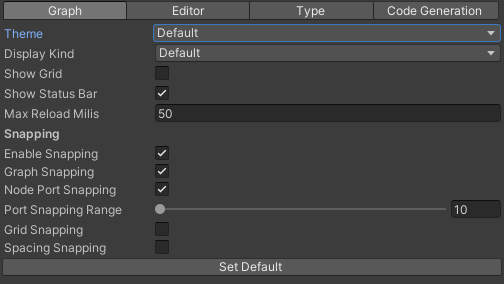
| Property | Description |
|---|---|
| Theme | The list of available graph theme, customization is available except for Default theme. |
| Display Kind | The display kind of a node. |
| Show Grid | Enable or disable the canva grid background. |
| Show Status Bar | Show or hide the status bar. |
| Max Reload Milis | The maximum progress in milis for loading graph in each frame. |
| Enable Snapping | Enable or disable the node snapping. |
| Graph Snapping | Enable or disable the snapping to a graph. |
| Node Port Snapping | Enable or disable the snapping to a node ports. |
| Port Snapping Range | The maximum range for port snapping. |
| Grid Snapping | Enable or disable the snapping to a grid. |
| Spacing Snapping | Enable or disable the spacing snapping. |
Editor category
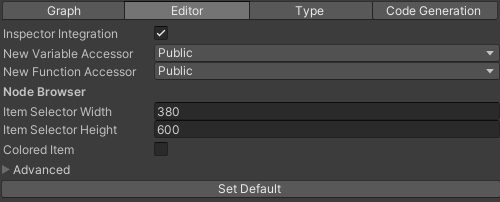
| Property | Description |
|---|---|
| Inspector Integration | Enable or disable the graph inspector integration to a Unity Inspector window. |
| New Variable Accessor | The new accessor modifier for new added variable |
| New Function Accessor | The new accessor modifier for new added function |
| Item Selector Width | The width of a Item Selector window |
| Item Selector Height | The height of a Item Selector window |
| Colored Item | If true, the item in Item Selector will be colorized based on it's kind |
Type category

| Property | Description |
|---|---|
| Type Color | Customize the type colors |
| Show Obsolete Item | Display the obsolete item when searcing item |
| Min Word For Deep Search | The miminum word for performing deep searching. |
| Included Assemblies | The included assemblies for searching item |
| Browser Namespaces List | The list of a namespaces that's displayed on Node Browser |
| Excluded Namespace | The list of excluded namespaces for searching |
| Excluded Type | The list of excluded types for searching |
Code Generation category
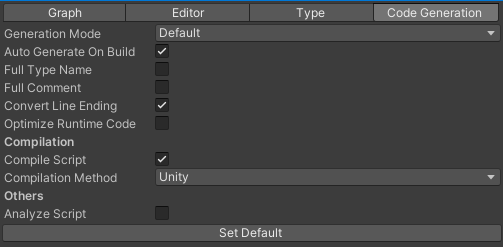
| Property | Description |
|---|---|
| Generation Mode | The generation mode for a graphs.
|
| Auto Generate On Build | If true, will auto compile all graphs in project on build |
| Full Type Name | If true, the type will be written in full type name including it's namespace |
| Full Comment | If true, will include the comment for nodes |
| Convert Line Ending | If true, will convert the line ending of the generated c# source |
| Optimize Runtime Code | If true, will make an optimization for the Runtime Graphs so it can be accessed with more fasters |
| Compile Script | Enable or disable compile before save |
| Compilation Method | The compilation method:
|
| Analize Script | Analize the generated script |